Build production-grade AI agents in .NET β from zero to running in minutes.
The concept: LLM, Tools, Reasoning and Context β how they work together to create autonomous behaviour.
What Microsoft Agent Framework is, where it comes from, and why it matters for .NET developers.
OpenAI Client β IChatClient β AIAgent. How the abstraction stack fits together.
Build your first agent from scratch and watch it run β with full GenAI traces in .NET Aspire.
A large language model (GPT-4o, Claude, Geminiβ¦) that understands language, reasons over input, and decides what to do next.
Functions the agent can call: search the web, query a database, call an API. The LLM decides when and how to use them.
Conversation history, session state, user profile. Gives the agent awareness of what happened before this turn.
An agent is not just a chatbot β
it thinks, decides, and acts.
Built by the same Microsoft teams. Combines AutoGen's simple agent abstractions with Semantic Kernel's enterprise features β session state, middleware, telemetry, and type safety.
Azure OpenAI Β· OpenAI Β· Anthropic Β· Gemini Β· GitHub Copilot Β· Ollama Β· Bedrock β switch with one line of code.
Individual agents that use LLMs, call tools and MCP servers, and generate responses. Simple API, powerful runtime.
Graph-based multi-agent orchestration: sequential, concurrent, group chat, handoff, and Magentic patterns.
A2A (Agent-to-Agent), AG-UI protocol, MCP servers, Azure Foundry hosting β works with the whole ecosystem.
The raw connection to your LLM provider. Handles authentication, endpoint routing, and HTTP. Swap providers without changing anything above.
The standard AI abstraction from Microsoft.Extensions.AI. Provider-agnostic interface β swap models without changing agent code above.
The MAF agent: adds tools, context, session state, instructions, and multi-turn conversation on top of IChatClient.
π‘ Each layer adds capabilities β but you only need the ones you use. Start with just OpenAI Client + AIAgent and add layers as you grow.
Plugs into the standard Microsoft.Extensions.Logging pipeline. Every agent action β LLM calls, tool invocations, errors β appears as structured log entries. Works with any log sink: console, Seq, Application Insights.
Emits OpenTelemetry spans following the GenAI semantic conventions. Captures model name, token counts, prompt content, tool calls, and latency β all as structured trace data.
π‘ Add both to your AIAgentBuilder chain β they're composable middleware. Zero config required beyond a LoggerFactory.
Model, tokens used, latency, prompt + completion content
Function name, input args, result, duration β as child spans
Prompt tokens, completion tokens, per call and aggregated
Failed tool calls and LLM errors appear as error spans with full context
// Layer 1 β Connect to your LLM provider var openAiClient = new OpenAIClient( new ApiKeyCredential(Environment.GetEnvironmentVariable("OPENAI_API_KEY")!)); // Layer 2 β Wrap as IChatClient (Microsoft.Extensions.AI) IChatClient chatClient = openAiClient .AsChatClient(modelId: "gpt-4o-mini"); // Layer 3 β Build your AIAgent with observability AIAgent agent = new AIAgentBuilder() .WithInstructions("You are a helpful assistant.") .UseChatClient(chatClient) .UseLogging(loggerFactory) // β structured logs in Aspire .UseTelemetry() // β OpenTelemetry GenAI traces .Build(); // Run it! string answer = await agent.RunAsync("What is MAF 1.5?"); Console.WriteLine(answer);
Raw provider connection. Swap to AzureOpenAIClient, Anthropic or Gemini without touching anything else.
IChatClient is the standard .NET abstraction β works with any AI extension in the ecosystem.
Two lines give you full GenAI trace data in .NET Aspire β token counts, latency, tool calls.
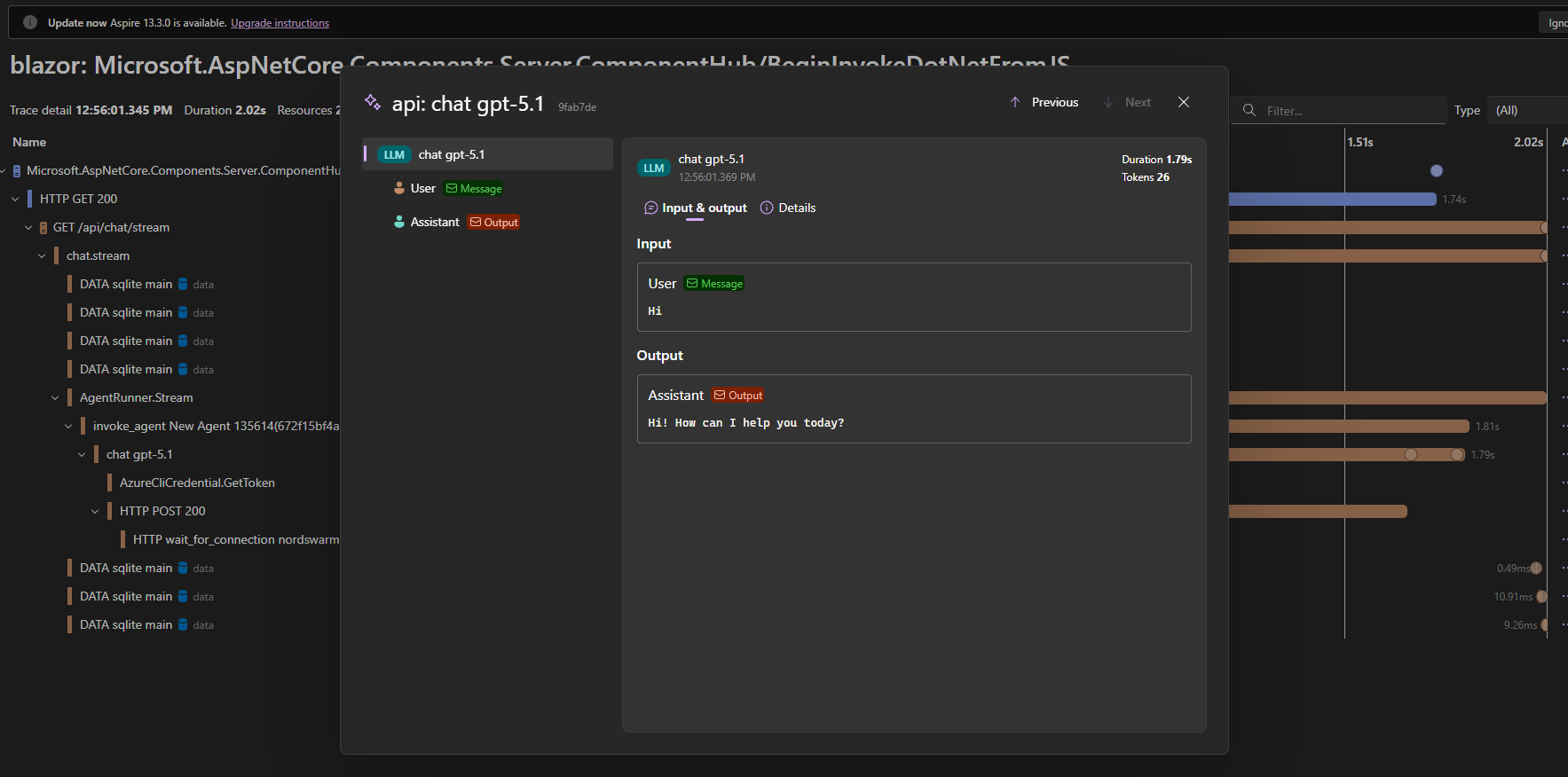
Aspire toont de exacte user input en assistant output per LLM call β geen zwarte doos meer. Ideaal voor debugging en prompt tuning.
Elke LLM span toont duration (bijv. 1.79s) en token gebruik (bijv. 26 tokens) β direct zichtbaar zonder extra logging code.
Van HTTP request β AgentRunner β invoke_agent β chat gpt-5.1: zie precies waar in de call stack de LLM wordt aangeroepen.
ΓΓ©n regel in je AIAgentBuilder. Aspire pikt het automatisch op via OpenTelemetry β zero extra configuratie.
Building a MAF 1.5 agent from scratch β in the IDE, step by step.
MAF 1.5 is production-ready, open source, and designed for .NET developers. Three layers, fifteen lines of code, and you have a running AI agent with full observability.